



Design Instant Interactions With Prefetch and Precompute
Users never complain that something took 100 milliseconds too long, but that delay still decides whether a product feels high-quality. Instant interactions come from prefetching likely next content and precomputing expensive work before anyone asks — not from hoping engineering will add speed later.
- Speed is a product differentiator Superhuman and WhatsApp used on purpose, because it is almost never requested after the fact.
- Instant search loads on keydown, one letter ahead, so results can appear as you release the key.
- Prefetch anything with more than a 50% chance of being shown, from the trigger that makes that next step likely.
- When the wait is a heavy calculation, precompute it overnight or after the events that change it, then refresh on demand.
Users never leave a comment that something took 100 milliseconds too long. They just walk away with a feeling: this product is sharp, or it is not. Instant interactions are easy to postpone. If speed is not designed into a feature from the start, it is usually forgotten, because nobody will come back later and demand it.
I recently read an article by Ruurtjan Pul on instant search: zero milliseconds between typing a letter and seeing the result. That is the dream of an experience that feels immediate. Speed is underestimated, and it is a differentiator. Several well-known products justified part of their value with how fast it felt to use them. That is often what separates a product that merely works from a product people actually like.
Instant Interactions Are a Product Differentiator
Speed is a product differentiator users never flag — and if you do not design it into each feature from the start, it almost never gets added later.
In email, the default is Gmail, Outlook, or something similar — and it is free. Superhuman showed up with a different promise: almost everything felt instant. Messages loaded fast. Opening one you had just selected felt instant too. That took work on both the UX and the technical side. It also let them charge a steep subscription for a category whose default tools are free. Instant interactions were marketed as the product, and they convinced a slice of users to pay.
WhatsApp is a broader case. Its success was not “we are faster than Messenger.” It was available worldwide, on every device, without tying you to a Facebook account. Those facts still depend on optimization. If you try messaging apps on a bad connection, WhatsApp is the one that keeps working, because from the beginning its core behavior was built to use relatively little data. Global access was not only a distribution story. It was an optimization story.
The useful design question is whether we can get closer to that ideal on purpose, instead of treating latency as an engineering leftover.
Prefetching UX Starts One Letter Ahead
Instant search feels instant because results start loading when you press the key — and the next letter is already on its way.
Ruurtjan Pul’s proof of concept searches every domain name in the world. The concept is ordinary. The differentiator is a result that appears the moment you release the letter. He gets there with two halves that only work together: smart loading, and the technical constraints that make that loading possible.
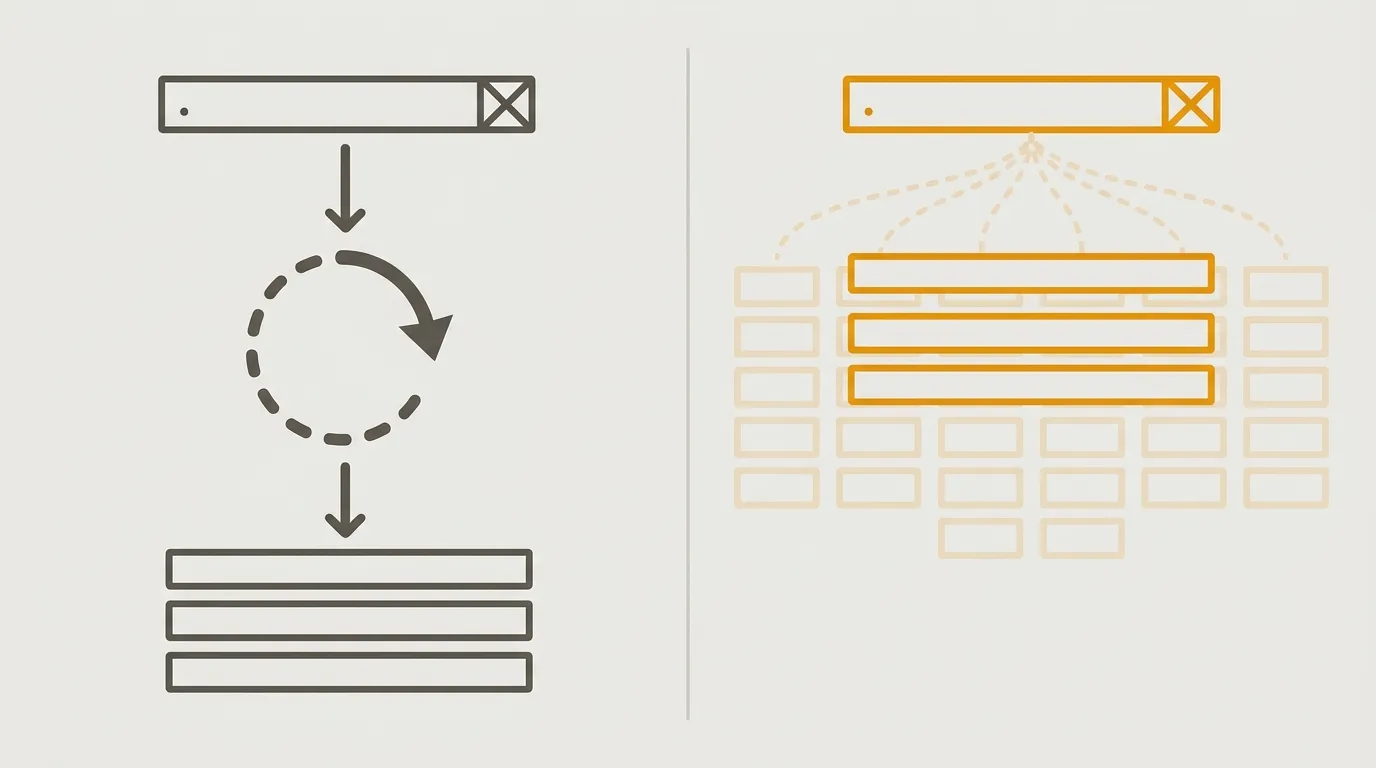
A classic search bar does almost nothing as you type. You press Enter, or you click Search, and results arrive a moment later. A more common pattern now is debounce: the product waits a few hundred milliseconds after the last character, then fetches. You skip the button. You still wait — for the letters, for the pause, for the request, for the render.
His version displays results as you release each key. On a keyboard, press and release are two moments. Loading starts on the press, not the release. That gap is small on its own. The real move is to load one letter ahead. Press G, and the product fetches results for G, then also for GA, GB, GC, and the rest. Type Google to find google.com: G loads G, and also starts GO. By the time you press O, GO is often already on the machine, so it can appear as you release O. Pressing O has already started GOA, GOB, GOC. You are always one step ahead.
A typical screen refreshes 60 times per second. That frame window is another sliver of time the product can spend loading. The whole thing is anticipation: decide when loading starts, and the perceived result is far better than average. It is also extreme. Most features will not get this much prefetch. Designers still need to know it exists, because these are the conversations we can take to engineering instead of treating latency as a wall.
The technical half is what makes the idea viable. Results are capped at eight, so you are not fetching a thousand hits for G and another eight hundred for GA. Cache means typing the same query twice does not refetch. And the search itself has to return in the small gap between one key and the next — you do not have five seconds. Those constraints are the price of instant. In his case, they are worth it.
Three ways a search bar waits
Submit on Enter
Debounced search
Instant prefetch
Prefetching UX You Can Actually Ship
If information has more than a 50% chance of being shown, prefetch it from the trigger that makes the next step likely.
The reusable idea is simpler than prefetching the whole alphabet. If a step is slow, could it have been loaded earlier? You need the content that actually takes time, and the user signal that makes the next step probable.
Onboarding is the obvious case. Someone on step A is very likely to open step B. If B is slow, start loading it in the background while A is on screen, and the second step can appear the moment they confirm the first. Tables with several tabs work the same way. You load the main tab with the page. If people jump between tabs a lot, prefetch the others so a click can show content that is already there.
Search bars themselves are another. Click the field and you often get an empty state with suggestions or recommendations — content that is not empty. There is usually a small delay between focus and those suggestions. Once you start typing, that empty state no longer matters. Load it as soon as the search bar is on screen, before it is selected, so the suggestions can appear the instant someone clicks.
That is invisible optimization. Users will not notice a prefetch. They will notice that they did not wait. The rule of thumb is rough: if information has more than a 50% chance of needing to be displayed, prefetch it. For half of users the extra work is not wasted.
The trigger can be basic — page load, an element appearing — or more precise: hovering a control, selecting a radio that tells you where the form will send them next. You are reading an intention and loading the likely next step. That conversation belongs with engineering. The initiative has to come from design, because these details are rarely anyone’s default job, even though they are part of what made WhatsApp and Superhuman feel different.
Quick check
When is prefetching worth doing?
The 50% rule is approximate: identify what is slow, then prefetch it from the user signal that makes the next step probable — page load, hover, a radio selection, or the step before it in a flow.
Precomputation When Loading Is Not Enough
If the wait is a long calculation, do the work before the user asks — overnight, or after the events that change the result.
Prefetching saves hundreds of milliseconds. That is useless when the wait is not transfer, it is compute. Exports, imports, and data-heavy dashboards often take seconds because the backend work itself is heavy. You should still ask whether you need a user signal before you start that work.
For a dashboard, that can mean calculating it every night, storing the result, and showing it almost instantly when someone opens it. The cost is obvious: the numbers are not live. They are as fresh as the last run. For many dashboards, exports, and imports, that is acceptable. Leave an on-demand refresh for people who want to wait, and recompute after the events that actually change the picture. Each time something material happens, rebuild the dashboard then — not when the user is staring at a spinner.
The question is the same one as prefetching, pointed at a slower class of work: are we required to leave the user waiting, or can we move the expensive moment somewhere they will not feel it?
Final Thoughts
Instant interactions are a technical conversation you have with your developers. Design still has to bring the proposal. It is not magic. It can be the difference between a product that functions and a product people trust. Prefetch the next likely step. Precompute the work that cannot be fetched in time. Ask for those things while the feature is still being designed — because once it ships without them, nobody will file a ticket for 100 milliseconds.
Get the next article first
Every new article, plus my weekly handpicked product nuggets.
Or only the blog posts via RSS:
FAQs
Why are instant interactions a product differentiator if users never mention speed?
Users almost never comment that something took 100 milliseconds too long, but that delay still creates a feeling of quality or the lack of it. If speed is not designed into each feature from the start, it is usually forgotten afterward.
How does instant search show results as you release each key?
Loading starts on keydown rather than keyup, and the product also prefetches results for every next letter. A typical screen refreshing 60 times per second adds a small extra window, so the next character can often display from cache.
When should a product prefetch content?
If information has more than a 50% chance of needing to be displayed, prefetch it. Identify what is slow to load and the trigger that makes the next step likely — page load, an element appearing, a hover, or a radio selection.
When is precomputation better than prefetching?
When the wait is a long backend calculation, such as a dashboard, export, or import, a few hundred milliseconds of prefetch is not enough. Compute the result overnight or after events that change it, store it, and let users refresh on demand if they need live data.